

Intelligence for healthier care
More time
for the patient.
AI patient conversations.
Clear clinical review.
Asclepius talks with patients, prepares their history and brings source-linked insurance work into one physician workspace.
Before the visit
The patient’s story,
before you walk in.
Share a secure interview link before the appointment, or open Clinical Intake on a clinic device. Patients speak with Asclepius AI about their main concern, then answer focused questions about symptoms, daily life and treatment so far.
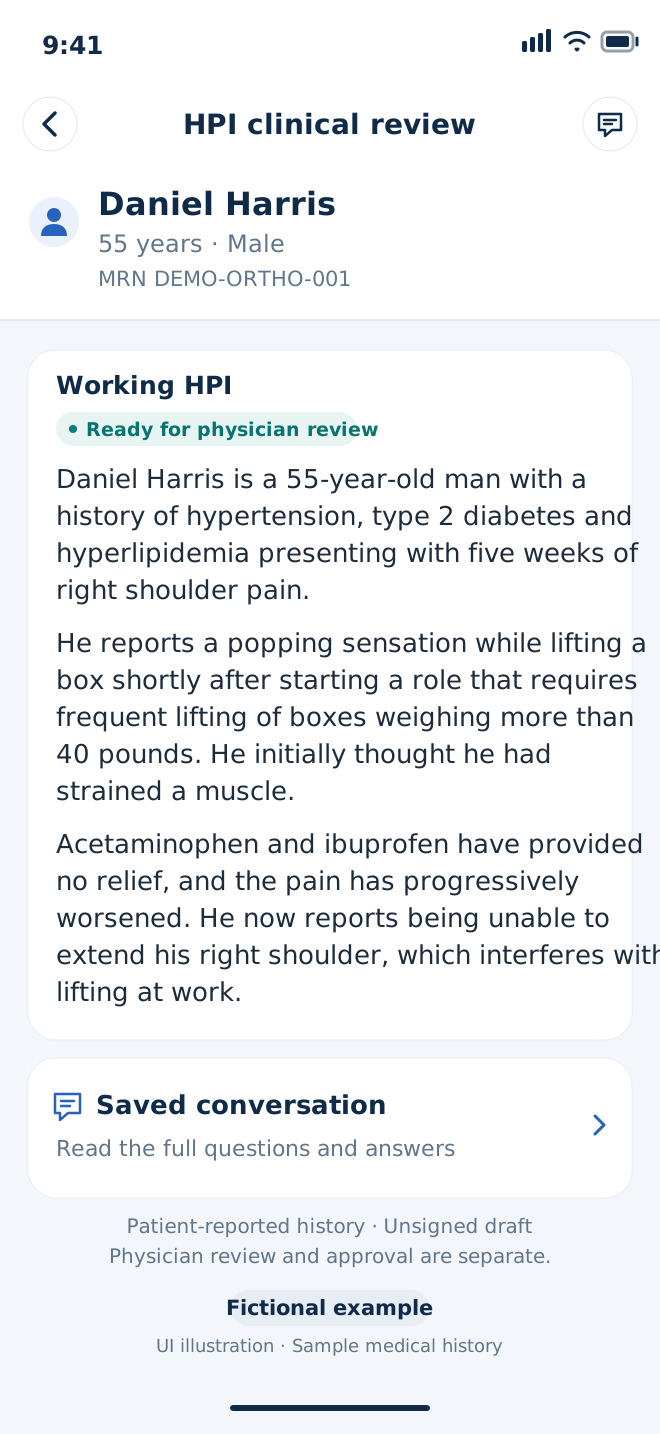
A working visit history—HPI—and the separate full conversation arrive in the patient’s profile. Review the important details and missing information before the visit, then use your time together for examination, clinical reasoning and treatment decisions.
How it works
How the work moves forward.
A secure link starts the patient conversation. The history, available chart records and source-linked drafts return to one review workspace.
- 01
AI patient interview
A one-use previsit link opens an AI voice interview. Patients can type, correct their words or stop.
Patient + Asclepius AI - 02
Chart + history
A working HPI, separate Q&A and available authorized chart records.
Asclepius prepares - 03
Clinical review
Review and edit the history, resolve essential gaps and complete the visit.
Physician decision - 04
Authorization packet
A focused rationale with source citations, relevant records and missing details.
Asclepius drafts - 05
Review + follow-up
Export the reviewed packet and keep recorded responses and next steps together.
Practice follow-up
Reviewed noteExport or supported EMR handoff
If deniedDraft response → review → follow-up
Payment checkMatch payment to the case record
EMR connections
Alongside the records
you already use.
Authorized EMR connections bring existing chart information into the workflow and support reviewed documentation handoffs. The same patient context connects intake, physician review and insurance preparation.
Tested
Developer environments
Epic public sandbox and athenaOne Preview, using selected fictional patient charts.
 Public sandbox
 Preview
Planned
Future integrations
Vendor onboarding and workflow testing are planned for these systems.
 Oracle Health (Cerner)





See Asclepius in context
Start with your practice.
Walk through a patient story and the work that follows. Talk with us about where Asclepius could fit into your workflow.
Product vision
Questions before we talk?
How does Asclepius give physicians more time for patients?
Before the visit, patients open a secure link and speak with Asclepius AI about their main concern. Focused follow-up questions build the history, and patients check their words before saving. A working HPI, the separate full conversation and available chart records arrive in the patient’s profile, so physicians can use the appointment for care. Physicians review the key facts, clarify gaps and make the clinical decisions.
How does Asclepius work with our existing EMR?
Your EMR remains the clinical record. Through an authorized connection, Asclepius brings available notes, orders, treatment history and supporting documents into the patient workspace. Physicians review the history and prepared work, then use the supported documentation handoff. Epic sandbox and athenaOne Preview workflows have been tested with selected fictional patients; other integrations are planned.
How does Asclepius handle authorizations and denials?
Asclepius prepares an authorization packet with a clear clinical argument, relevant records and a checklist of missing information. When a request is denied, it analyzes the stated reason and drafts a focused response supported by the patient’s documented history and treatment course. The same case keeps deadlines, payer responses and payment follow-up together.
How is patient information protected?
Access is limited to authorized users and their permitted patient workspaces, with identity checks, access controls and a record of changes. Patient invitations include identity confirmation and consent. Source-linked review and physician approval keep clinical documentation and insurance packets tied to the information that was reviewed.
Can I manage the workflow myself, including on my iPhone?
Yes. Physicians can review patient conversations and HPI notes, resolve essential questions, and approve authorization or appeal drafts from desktop or iPhone. A shared patient dashboard keeps the history, documents and next steps together; staff support is optional.
For investors: our $4 million plan
See the budget, 18-month milestones and planned seed stage →